
| Planetary Rings plug-in | |
|---|---|
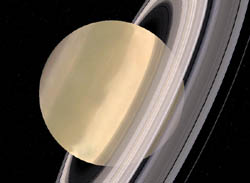 Saturn with rings
| |
| Developer | Patrick Murris |
| Latest release | 0.9 / May, 2006 |
| License | Public domain |
| Web site | Plug-in Website |
This plugin adds rings around Jupiter, Saturn, Neptune and Uranus.
Contents |
Download Planetary Rings for World Wind 1.4 or Planetary Rings 0.9 for World Wind 1.3.x and extract the file to your World Wind Plugins directory.
To use the plug-in load World Wind, open the Plug-Ins menu and click Load/Unload… (see figure 1).
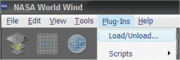

Click on ‘Planetary Rings’ in the Plugin Load/Unload window and then press the Load button, the indicator next to ‘Planetary Rings’ should turn green, you can now safely close the Plugin Load/Unload window.
To access the plug-in settings, right-click on the layer in the Layer Manager and select Properties.
Settings allow to select different rings textures when availables and to turn shadows on and off.
You can unlock the Sun so that it follows the camera latitude (or the inverse if ‘Invert’ is checked) and watch different shadow configurations. Once you have one you like, just lock the sun again.