
The keyboard actions allow you to control World Wind.
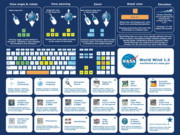

| Action | key 1 | key 2 | key 3 |
|---|---|---|---|
| Movement | |||
| Pan Up | Numpad 8 | Up | U |
| Pan Down | Numpad 2 | Down | J |
| Pan Left | Numpad 4 | Left | H |
| Pan Right | Numpad 6 | Right | K |
| Rotate clockwise | A | — | — |
| Rotate counter-clockwise | D | — | — |
| Reset Rotation | Numpad 5 | Space | — |
| Tilt Down | W | — | — |
| Tilt Up | S | — | — |
| Zoom In | Numpad 7 | Home | + |
| Zoom Out | Numpad 1 | End | – |
| FOV Increase | ALT+- | — | — |
| FOV Decrease | ALT++ | — | — |
| Toggle Constant Motion | F11 | — | — |
| Toggle Point goto | F12 | — | — |
| HUD | |||
| Toolbar | Ctrl+T | — | — |
| Lat/Lon lines | F7 | — | — |
| Planet Axis | F8 | — | — |
| Crosshairs | F9 | Alt+C | — |
| Position | F10 | — | — |
| Wireframe | Ctrl+W | — | — |
| Diagnostic Info | Ctrl+D | — | — |
| Sun Shading | Shift-S | — | — |
| Atmosphere | Shift-A | — | — |
| Tools | |||
| Layer manager | L | — | — |
| Path maker | P | — | — |
| Place Builder | V | — | — |
| Place Finder | F6 | Ctrl+F | G |
| SVS | F1 | — | — |
| Modis | F2 | — | — |
| WMS | B | — | — |
| Download monitor | Ctrl+H | — | — |
| World Settings | Alt+W | — | — |
| World Wind Settings | Alt+Q | — | — |
| Vertical Exaggeration | |||
| 0x | 0 | — | — |
| 1x | 1 | — | — |
| 2x | 2 | — | — |
| 3x | 3 | — | — |
| 4x | 4 | — | — |
| 5x | 5 | — | — |
| 6x | 6 | — | — |
| 7x | 7 | — | — |
| 8x | 8 | — | — |
| 9x | 9 | — | — |
| Window | |||
| Always on top | Alt+A | — | — |
| Close | Alt+F4 | — | — |
| Full-screen | Alt+Enter | — | — |
| End Full-screen | Escape | — | — |
| Refresh view | F5 | — | — |
| Edit Copy | Ctrl+C | Ctrl+Insert | — |
| Edit Paste | Ctrl+V | Shift+Insert | — |
| Save Screenshot | Ctrl+S | — | — |