
Contents |
Add-ons are basically new features for World Wind which are not produced by NASA, why do you need them? Well the simple answer is they are cool, you can use them to view other planets, see the routes taken by famous explorers, zoom into areas not covered by NASA data, and much more. This page will introduce you to a few of the many add-ons available and give you basic instructions on how to use them.
Plug-ins are different to add-ons, although they can be considered to be a type of add-on, they can be far more powerful and therefore are not quite so simple to install, you should only install a plug-in if you completely trust the source. So what are they? Well they are pieces of code written in C#, VB or J# which are loaded and compiled by World Wind at startup, basically allowing plug-in developers to add features to World Wind without changing the program’s source code.
Some plug-ins will come with a self installing exe, others as a compressed file such as a zip, the self installing ones should be fairly simple to install just double click the downloaded file and follow the prompts, compressed files should be extracted to the Plugins directory usually found in ‘Program Files\NASA\World Wind 1.3’.
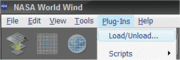
Once the plug-in is installed there are a few more steps needed to make World Wind use it, first load World Wind, then open the Plug-Ins menu and click Load/Unload… (see ‘Plug-In figure 1’).

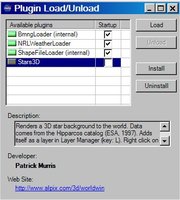
Next click on the plug-in you wish to load in the Plugin Load/Unload window, Stars3D in this example, and then press the Load button (see Plug-In figure 2), the indicator next to the plug-in should turn green, if you wish to have World Wind automatically load the plug-in each time it stars tick the Startup checkbox, you can now safely close the Plugin Load/Unload window. The plug-in is now loaded and ready to use.
Most of the add-ons listed on this page come as a self installing executable file, simply download them, doubleclick them and follow any on-screen instructions as you would any other application you download off the internet. Note – make sure World Wind is closed before installing new add-ons.
Once installed run World Wind and the add-on will automatically be loaded, some add-ons will add an icon to your World Wind toolbar, which when clicked on activates that add-on, for example the Darwin add-on has an icon which looks like this:

Other add-ons need activating from the ‘Layer Manager‘, to open the ‘Layer Manager’ click the icon in World Winds toolbar:

The ‘Layer Manager’ shows a list of all add-ons installed plus any imagery data sets included by NASA, find the add-on you are looking for in the list and click in the square box next to its name, it will become ticked, this means the add-on is activated:

You can then safely click the cross at the top right of the ‘Layer Manager’ to close it.
Some add-ons may have additional options, such as the Solar System add-on, to find these open the ‘Layer Manager’ and click the triangle next to the add-on’s name, a sub menu will appear like this one:

To choose an item in a sub menu simply click on the small circle next to that item and it will become selected, like Mercury is in the screenshot above.
The Virtual Earth plug-in gives World Wind users the ability to view imagery from Microsoft’s local.live.com website.
Please note this imagery is owned by Microsoft and may only be used for non-commercial purposes. Any other use must be coordinated with the Microsoft Virtual Earth team. All imagery obtained using this plug-in is copyrighted and may not be redistributed in any form.
Download – Virtual Earth plug-in

The Planimetric Measure Tool plug-in is very useful, it allows you to measure the distance between two points within World Wind, this could be a very handy tool for geography lessons.

The Near Realtime Earthquake Marker plug-in is another must have for geography and geology teachers, it is a semi-near realtime Plug-In that shows marker points where earthquakes have occurred.

If you have a pair of red/cyan anaglyph glasses lying around then you must install the Anaglyph 3D plug-in, once installed put on your glasses and you will see a true 3-Dimensional Earth, or whichever other heavenly body you prefer.


So you want more? You can find many more add-ons on WorldWind Central’s full list of add-ons, some are educational, some are fun, and some are just crazy, also check the 1.4 plug-ins list for more cool plug-ins. There is a list of recently added or updated add-ons, and if you have been motivated to make your own add-on check out the creating add-ons page for some relevant links.
None of these add-ons or plug-ins are produced or endorsed by NASA, they are produced by various individuals from the World Wind community, and WorldWind Central cannot be held responsible for any damage caused by installing any of the above add-ons or plug-ins. As with all software you install you should scan it with anti-virus software after downloading, and make sure your software’s virus database is up to date.