
| Stars3D plug-in | |
|---|---|
 Stars
| |
| Developer | Patrick Murris |
| Latest release | 1.1 / Dec, 2005 |
| License | Public domain |
| Web site | Plug-in Website |
Not compatible with World Wind 1.4
This plug-in is now included in World Wind
This plug-in adds a dynamicaly rendered starfield background to World Wind using data from the Hipparcos catalog. Settings allow to choose between two subsets : stars with magnitude down to 6 (5.044 stars – default) or 7.7 (31.399 stars).
Contents |
Download Stars3D 1.1 and double click the downloaded file, follow the on-screen prompts to install the Plug-In.
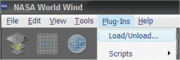
To use the plug-in load World Wind, open the Plug-Ins menu and click Load/Unload… (see figure 1).

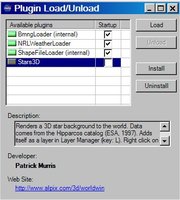
Click on ‘Stars3D’ in the Plugin Load/Unload window and then press the Load button (see figure 2), the indicator next to ‘Stars3D’ should turn green, you can now safely close the Plugin Load/Unload window. You should now see a star field instead of a black sky.
To choose different versions of the star background (5.000 or 31.000 stars), right click on the Stars3D layer in the Layer Manager and click properties (see figure 3) to change the settings (see figure 4).


The installer for this plug-in was created using a script created by mazop.